Amazon
Facebook Ads to Amazon: How to Send Traffic and See Which Ad Sells
How to run Facebook and Instagram ads to an Amazon listing: where to send the click, deep links to the Amazon app, Attribution tags and seeing which ad sells.
By PixlBridge Team
Updated 12 min read
On this page
Running Facebook and Instagram ads to an Amazon listing takes a minute to set up: paste the product’s Amazon address into the ad and publish. Knowing which ad sold anything is the hard part. The sale happens on Amazon, where the Meta Pixel can’t run, so Meta sees the click and nothing after it, and Amazon’s sales reports don’t say which ad sent the shopper. This guide covers where to send Meta traffic on Amazon, how to open the Amazon app from an ad on phones (deep linking), how to tag each ad with Amazon Attribution so you can see which one sells, and how to send those sales back to Meta.
Disclosure: PixlBridge publishes this guide and makes the tracking link and the Conversions API step described in it. Steps 1, 2 and 4 work with Amazon’s free tools alone. Amazon and Meta rename menus from time to time, so if a label below differs from your screen, follow what yours shows.
Quick answer: how to run Facebook ads to Amazon
- Choose where the click goes: your product’s detail page for an ad about one product, or your Brand Store for a range.
- Tag the link with Amazon Attribution. For Facebook, Amazon’s macro tag reports results for each campaign, ad set and ad.
- Open the Amazon app on phones with a deep link, and put the link in the ad as its Website URL.
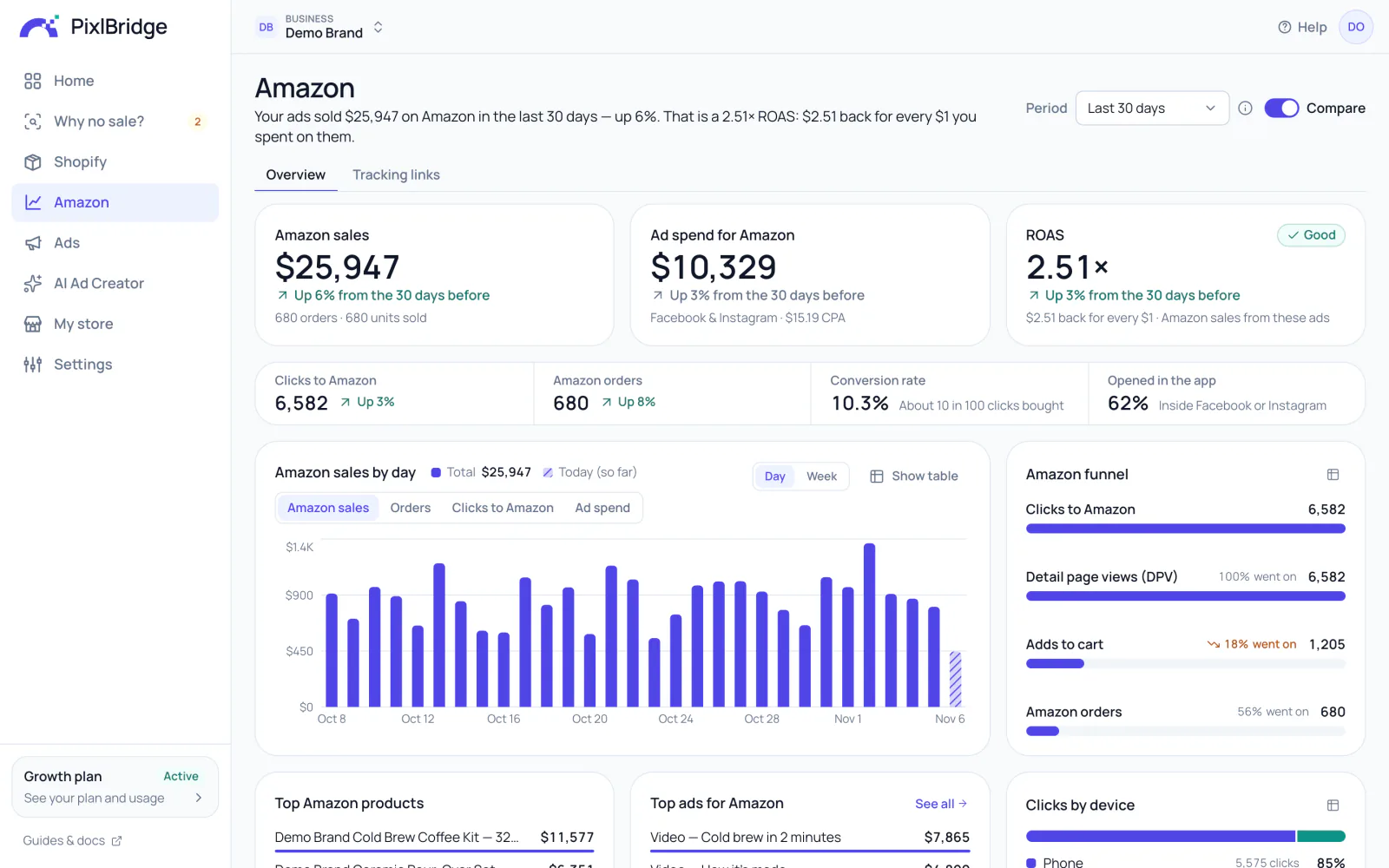
- Read Amazon’s report a few days later: click-throughs, detail page views (DPV), adds to cart, purchases and sales for each ad, next to its spend in Ads Manager.
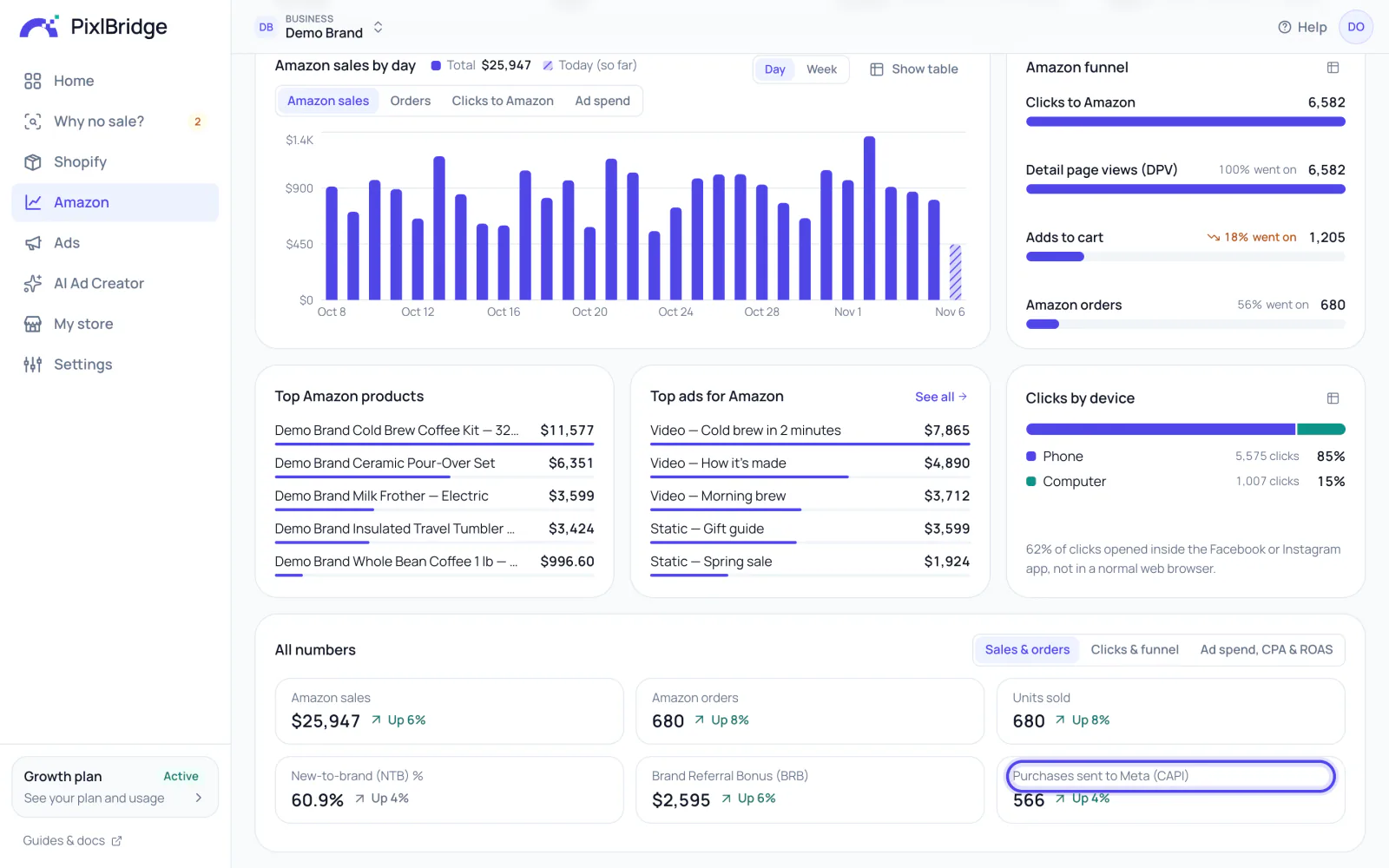
- Send the Amazon purchases back to Meta through the Conversions API (CAPI), so Meta can look for buyers instead of clickers.
Why Meta can’t see your Amazon sales
On your own website, the Meta Pixel in the shopper’s browser and the Conversions API (CAPI: events sent to Meta from a server) tell Meta about each purchase, so its delivery system learns which people buy. Amazon doesn’t let brands put a pixel on its pages, so Meta’s view ends at the click on your ad.
That has two effects. Ads Manager can’t show you which ad led to an Amazon sale. And Meta can only optimize Amazon traffic for link clicks unless purchases are sent back, so it gets good at finding people who tap, who aren’t necessarily the people who buy. Why Meta optimizes for link clicks instead of buyers explains what that does to delivery. Steps 2 and 4 below fix the first problem with Amazon’s own tools, and step 5 fixes the second.
Step 1: choose where the click goes
There are three usual places to send Meta traffic for an Amazon product:
| Destination | Good for | Watch out for |
|---|---|---|
| Product detail page | An ad that shows one product | Start from the clean product address, amazon.com/dp/ followed by the ASIN (the product’s 10-character Amazon id), not one copied from search results |
| Brand Store page | An ad for a range, a collection or a launch with several variants | A store page can carry an Attribution tag too, so tag it like a product page |
| Your own landing page first | Explaining a new product, or collecting emails, before the shopper sees Amazon | One more step before the Buy button. Your pixel sees the landing page, not the Amazon purchase |
The product detail page is the shortest path to a sale: the shopper lands where the price, the reviews and the Buy button are. Whichever you pick, the rest of this guide is about the Amazon link itself.
Step 2: tag the link with Amazon Attribution
Amazon Attribution is Amazon’s free measurement tool for marketing outside Amazon. Amazon makes it available to brand owners enrolled in Brand Registry and to vendors. You add a tag, a few URL parameters, to the Amazon address in your ad, and Amazon reports what happened after clicks on it. If you haven’t used it yet, how to find and set up Amazon Attribution covers the login, who can use it and the first tag.
For Facebook, Amazon gives you one macro tag. It contains three placeholders, and when someone clicks your ad, Meta fills them with the ids of the campaign, the ad set and the ad:
https://www.amazon.com/dp/B0EXAMPLE1?maas=…&ref_=aa_maas&tag=maas
  &aa_campaignid={{campaign.id}}
  &aa_adgroupid={{adset.id}}
  &aa_creativeid={{ad.id}}
That example is shortened and split over four lines to make it readable; copy the exact tag Amazon gives you, on one line. Amazon creates a campaign and ad group in your Attribution account for each new value it receives, so its report breaks results down by campaign, ad set and ad with no extra setup. That’s also why the macro tag can go into several ads: each click carries its own ad’s ids. Amazon Attribution tags explained takes a tag apart, parameter by parameter.
Step 3: deep link the ad to the Amazon app
On phones, tapping the link in a Facebook or Instagram ad opens it inside the app’s own browser (the in-app browser). That browser is separate from the Amazon app and from the phone’s main browser, so the shopper usually isn’t signed in to Amazon there. To buy, they have to sign in first, or go and find the product again in the Amazon app.
A deep link avoids that detour: it opens the product straight in the Amazon app when it’s installed, and in the browser when it isn’t. A plain Amazon address in the ad doesn’t do this by itself; the link has to go through a redirect that recognizes the phone and hands the shopper to the app. A good deep link for Amazon:
- keeps the Amazon Attribution tag on the address it opens, so the click can still be credited to the ad;
- opens the product page itself, not the Amazon home page;
- falls back to the browser when the app isn’t installed;
- records the click before handing over, so you can count clicks for each ad.
PixlBridge’s tracking link (go.pixlbridge.com) works this way. It records the click, adds the Attribution tag for the ad it’s in, and opens the product in the Amazon app on iPhone and Android, or in the browser when the app isn’t there. Its links only ever lead to Amazon. The Meta ads to Amazon Attribution setup guide shows how to make one for each ad.
Put the link in the ad
In Meta Ads Manager, open the ad and paste the link as its Website URL. With Amazon’s macro tag, paste the whole tagged address with the placeholders as they are. With a PixlBridge tracking link, paste the short link as it is, including its {{ad.id}} part: Meta puts the ad’s id there when someone clicks. Leave Meta’s own URL parameters on.
Then test it the way shoppers will meet it: publish the ad and tap it on your own phone, once in the Facebook app and once in the Instagram app. Pasting the tagged address into a browser isn’t a real test, because the placeholders arrive as text and name no ad.
Step 4: see which ad sells on Amazon
With the macro tag in place, Amazon Attribution reports these for each campaign, ad set and ad:
- Click-throughs: clicks on your tagged link that reached Amazon.
- Detail page views (DPV): visits to your product page.
- Adds to cart.
- Purchases and units: orders, and the items in them.
- Sales: what those purchases were worth.
- Brand Referral Bonus: Amazon’s estimate of the bonus, if you’re enrolled.
Amazon’s report covers what happened on Amazon, so for an ad’s ROAS (return on ad spend: sales ÷ ad spend) you put its Amazon sales next to its spend in Ads Manager. Two timing rules matter. Amazon credits a click with an add to cart or purchase made within 14 days of it, so a week’s numbers keep growing after the week ends. And the report arrives with a delay of about a day or two, with recent days still filling in. Judge an ad on a period that ended a few days ago, not on yesterday.
What ROAS do you need on Amazon?
A ROAS is only good or bad next to your margin. On Amazon, the margin has to cover the product and Amazon’s fees (the referral fee, and fulfillment if you use Fulfillment by Amazon) before anything is left for ads. Your break-even ROAS is 1 ÷ that margin: at a 25% margin, $4 of Amazon sales for each $1 of ads. The break-even ROAS calculator does the arithmetic, and the Brand Referral Bonus lowers the number for tagged sales.
Step 5: send Amazon sales back to Meta
Amazon Attribution tells you which ad sold. It doesn’t tell Meta, so delivery doesn’t change. For that, the Amazon purchases have to reach Meta as events, through the Conversions API.
PixlBridge does this part. It reads your Attribution reports, matches each Amazon sale to the ad whose click led to it, and sends Purchase and AddToCart events to your Meta dataset through the Conversions API. You see which ad brings which Amazon sale, with each ad’s ROAS, and Meta gets the purchases it needs to look for buyers.
Traffic or Sales campaign?
While no Amazon purchases reach Meta, link clicks are the only thing it can optimize Amazon traffic for. Once they do, try a Sales campaign optimized for Purchase on your best creatives, with the tracking link as the destination. Purchases are rarer than clicks and Amazon reports them late, so expect a slower start; if there are too few, AddToCart is a stepping stone. The link-clicks guide covers how to restructure campaigns around the new signal.
Common mistakes with Facebook ads to Amazon
- No tag on the link. The sale can still happen, but Amazon can’t credit it to the ad, and it can’t earn the Brand Referral Bonus.
- A product address with someone else’s parameters. Addresses copied from search results or affiliate links carry extra parameters, sometimes their own
tag=. Start from the clean/dp/address. - A generic link shortener. Some drop the query string, and the tag with it. Use a redirect built for Amazon.
- One fixed tag in several ads. A tag without placeholders reports those ads together. Use the macro tag, or one link per ad.
- A duplicated ad with a changed address. When you duplicate an ad and edit it, check that the copy’s Website URL still carries the tag.
- Judging yesterday. Amazon’s report runs a day or two behind and keeps adding sales for 14 days after a click.
Summary
Facebook and Instagram ads can send shoppers straight to your Amazon listing, but neither Meta nor Amazon’s sales reports will tell you which ad sold unless the link carries an Amazon Attribution tag. Use Amazon’s Facebook macro tag (or a tracking link that adds it) so Amazon reports each campaign, ad set and ad, open the Amazon app on phones with a deep link, read the numbers a few days late, and send the Amazon purchases back to Meta through the Conversions API so it can find buyers.
PixlBridge does the tagging, the deep link, the ROAS of each ad and the Conversions API in one place. Start free with 5 tracking links, or try an Amazon plan free for 14 days, with no card required. Amazon plans start at $49 a month.
Frequently asked questions
Can you run Facebook ads to an Amazon listing?
Yes. A Facebook or Instagram ad can use your Amazon product page as its Website URL, like any other website. Add an Amazon Attribution tag to the address so Amazon can report what the ad’s clicks did on Amazon.
How do I know which Facebook ad made an Amazon sale?
Put Amazon Attribution’s Facebook macro tag on the Amazon address in the ad. Meta fills in the campaign, ad set and ad ids when someone clicks, so Amazon’s report shows click-throughs, detail page views, adds to cart, purchases and sales for each ad. PixlBridge shows the same for each ad, with its ROAS.
Can a Facebook ad open the Amazon app?
Not with a plain Amazon link: on phones it opens inside the Facebook or Instagram app’s own browser. A deep link, such as a PixlBridge tracking link, opens the product in the Amazon app when it’s installed and in the browser when it isn’t, with the Attribution tag kept on the address.
Does the Meta Pixel work on Amazon?
No. Amazon doesn’t let brands add a pixel to its pages, so Meta sees the click on your ad and nothing after it. Sending Amazon purchases to Meta through the Conversions API (CAPI) is how Meta learns about those sales.
Should I use a Traffic or a Sales campaign for Amazon?
While no Amazon purchases reach Meta, it can only optimize Amazon traffic for link clicks. Once Amazon purchases are sent to Meta through the Conversions API, a Sales campaign optimized for Purchase lets Meta look for buyers instead of clickers. Expect a slower start, since purchases are rarer than clicks.
Do Facebook ads to Amazon earn the Brand Referral Bonus?
They can. Brand-registered sellers enrolled in the Brand Referral Bonus earn it on sales from outside Amazon that Amazon Attribution measures, so the ad’s link needs an Attribution tag. Amazon says the bonus averages about 10% of those sales.
How long does Amazon take to report sales from Facebook ads?
About a day or two, and the numbers for recent days keep filling in. Amazon credits a click with an add to cart or purchase made within 14 days of it, so judge an ad on a week that ended a few days ago.